---
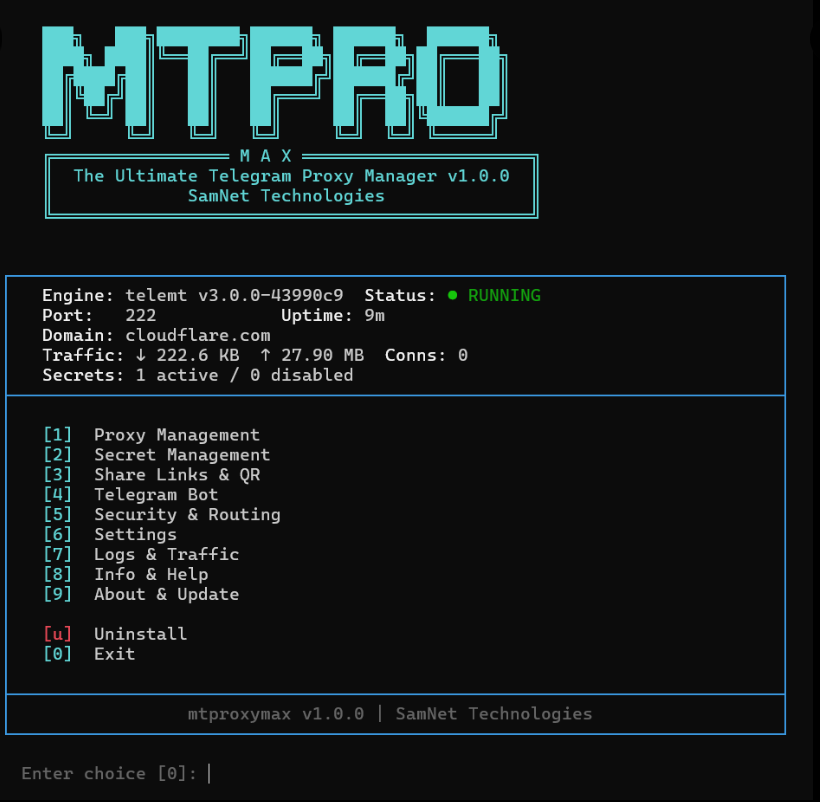
MTProxyMax is a full-featured Telegram MTProto proxy manager powered by the **telemt 3.x Rust engine**. It wraps the raw proxy engine with an interactive TUI, a complete CLI, a Telegram bot for remote management, per-user access control, traffic monitoring, proxy chaining, and automatic updates — all in a single bash script.
```bash
sudo bash -c "$(curl -fsSL https://raw.githubusercontent.com/SamNet-dev/MTProxyMax/main/install.sh)"
```
## Why MTProxyMax?
Most MTProxy tools give you a proxy and a link. That's it. MTProxyMax gives you a **full management platform**:
- **Multi-user secrets** with individual bandwidth quotas, device limits, and expiry dates
- **Telegram bot** with 17 commands — manage everything from your phone
- **Interactive TUI** — no need to memorize commands, menu-driven setup
- **Prometheus metrics** — real per-user traffic stats, not just iptables guesses
- **Proxy chaining** — route through SOCKS5 upstreams for extra privacy
- **Auto-recovery** — detects downtime, restarts automatically, alerts you on Telegram
- **Pre-built Docker images** — installs in seconds, not minutes
---
## Quick Start
### One-Line Install
```bash
sudo bash -c "$(curl -fsSL https://raw.githubusercontent.com/SamNet-dev/MTProxyMax/main/install.sh)"
```
The interactive wizard walks you through everything: port, domain, first user secret, and optional Telegram bot setup.
### Manual Install
```bash
curl -fsSL https://raw.githubusercontent.com/SamNet-dev/MTProxyMax/main/mtproxymax.sh -o mtproxymax
chmod +x mtproxymax
sudo ./mtproxymax install
```
### After Install
```bash
mtproxymax menu # Open interactive TUI
mtproxymax secret list # See your users
mtproxymax status # Check proxy health
```
---
## Features
### FakeTLS Obfuscation
MTProxyMax uses **FakeTLS (TLS 1.3)** by default. Your proxy traffic looks identical to normal HTTPS traffic to any network observer or DPI system. The TLS handshake SNI points to a cover domain (e.g., `cloudflare.com`), making it indistinguishable from regular web browsing.
**Traffic masking** goes further: when a non-Telegram client connects (e.g., a censor probing your server), the connection is seamlessly forwarded to the real cover domain. Your server responds exactly like cloudflare.com would — because it's actually proxying to it.
### Multi-User Secret Management
Each user gets their own **secret key** with a human-readable label. You can:
- **Add/remove** users instantly — config regenerates and proxy hot-reloads
- **Enable/disable** access without deleting the key
- **Rotate** a user's secret — new key, same label, old link stops working
- **Generate links** — both `tg://` and `https://t.me/proxy` formats
- **QR codes** — scannable directly in Telegram settings
### Per-User Access Control
Fine-grained limits enforced at the engine level:
| Limit | Description | Example |
|-------|-------------|---------|
| **Max Connections** | Simultaneous TCP connections | `100` |
| **Max IPs** | Unique devices/IPs allowed | `5` |
| **Data Quota** | Total bandwidth cap | `10G`, `500M` |
| **Expiry Date** | Auto-disable after date | `2026-12-31` |
```bash
mtproxymax secret setlimit alice 100 5 10G 2026-12-31
```
This means: Alice can use up to 100 simultaneous connections from max 5 devices, with 10GB total bandwidth, expiring Dec 31, 2026.
### User Management Recipes
#### Prevent Key Sharing
By default a secret key is unlimited — anyone who has the link can use it from any device or IP. To lock it to one person:
```bash
mtproxymax secret setlimit alice ips 1 # Alice only, no sharing possible
mtproxymax secret setlimit family ips 5 # Family of up to 5 devices
```
If someone with `ips 1` shares their link, the second IP that tries to connect gets rejected by the engine automatically.
#### IP Limit Tiers
| Scenario | `max_ips` |
|----------|-----------|
| Single person, one device | `1` |
| Single person, multiple devices | `2-3` |
| Small family | `5` |
| Small group / office | `20-30` |
| Public/open link | `0` (unlimited) |
#### Create a Time-Limited Sharing Link
```bash
# Public link: 50 simultaneous connections, 30 unique IPs, 10GB cap, expires June 1st
mtproxymax secret add shared-link
mtproxymax secret setlimits shared-link 50 30 10G 2026-06-01
```
When the expiry date hits, the link stops working automatically. No manual cleanup needed.
#### Per-Person Keys (Recommended for Control)
```bash
mtproxymax secret add alice
mtproxymax secret add bob
mtproxymax secret add charlie
# Each person gets their own link — revoke individually without affecting others
mtproxymax secret setlimit alice ips 2
mtproxymax secret setlimit bob ips 1
mtproxymax secret setlimit charlie ips 3
```
#### Temporarily Cut Someone Off
```bash
mtproxymax secret disable bob # Bob can't connect, link preserved
mtproxymax secret enable bob # Bob is back, same link works
```
#### Revoke a Leaked Link
```bash
mtproxymax secret rotate alice # New key generated, old link dies immediately
```
Alice gets a new link. Anyone who had the old link is disconnected and can't reconnect.
#### Full Cleanup
```bash
mtproxymax secret remove bob # Permanent — key gone, link dead forever
```
All other users are completely unaffected since each secret is independent.
---
### Telegram Bot (17 Commands)
Full proxy management from your phone. Setup takes 60 seconds:
```bash
mtproxymax telegram setup
```
| Command | Description |
|---------|-------------|
| `/mp_status` | Proxy status, uptime, connections |
| `/mp_secrets` | List all users with active connections |
| `/mp_link` | Get proxy links + QR code image |
| `/mp_add